
Cloud Modernization Strategy, Costs & Roadmap
Cloud modernization is the process of updating applications, data and infrastructure so they fully use the cloud, not just run in it. In 2026, enterprises modernize to cut wasted cloud spend, retire costly legacy systems before support ends, and get ready for AI workloads.
Most enterprise organizations are already in the cloud. Only some have modernized it. The gap between the two leads to:
- Budget misallocation
- Application underperformance
- Years of technical debt
Why the gap matters in 2026:
- 73% of organizations run hybrid cloud (Flexera 2026).
- Wasted cloud spend rose to 29%, the first increase in five years.
- Generative AI cloud services are now used by 58% of organizations.
- Gartner forecasts infrastructure as a service (IaaS) spending of $287 billion in 2026, up 29.3% (Gartner).
This guide covers what cloud modernization is, how to build a cloud modernization strategy, what it costs, and how enterprises in the US, the UK and beyond build a roadmap that finance and engineering teams both support.
What is cloud modernization?
Cloud modernization updates three layers so they deliver the full benefits of the cloud:
- Applications: refactoring legacy applications to be cloud-native, through application modernization and replatforming.
- Legacy systems: retiring or replacing systems that are costly to run or no longer supported.
- Infrastructure and data: optimizing cloud infrastructure and modernizing data platforms.
Cloud migration vs. cloud modernization
These two terms are often confused, and that confusion leads many organizations to overspend on cloud services without seeing the benefits.
- Migration moves workloads to the cloud, typically by lift and shift.
- Modernization rethinks how applications are built and run so they fully use the features of the cloud.
- Organizations that only migrate reduce capital expenditure, but often miss the promised agility.
| Aspect | Cloud migration | Cloud modernization |
| Goal | Move workloads to the cloud | Get full cloud value from workloads |
| Typical approach | Rehost (lift and shift) or relocate | Replatform, refactor, repurchase or retire |
| Pace | Fast, in migration waves | Iterative, over months |
| Cost impact | Lower capital spend; run costs can rise if nothing is optimized | Lower run costs and less technical debt over time |
| Business impact | Same application, new location | Faster releases, elastic scale, AI-ready data |
| Best for | Data center exits and end-of-support deadlines | Core applications with high value or high technical debt |
Most enterprises do both. AWS advises large programs to rehost or replatform first and modernize after the move (AWS), often on a managed hybrid cloud infrastructure.
Why modernization matters: the cost of legacy systems
Legacy systems accrue technical debt that comes with an opportunity cost:
- Every hour spent maintaining legacy applications is an hour developers cannot spend on new work.
- Higher licensing costs, security liabilities and slower time-to-market compound that cost.
- The financial risk is significant, so the cost-benefit analysis quickly tilts toward modernization.
The 2026 evidence
- Legacy risk (US example): the US government spends over $100 billion a year on IT, most of it to run and maintain existing systems. Of the 11 most critical federal legacy systems, 8 use outdated languages and 7 have known cybersecurity vulnerabilities (GAO-25-107795).
- AI readiness: AI needs clean, accessible data and compute that scales on demand, which most legacy stacks cannot provide. Modernizing first gives generative AI projects a solid foundation.
- End-of-support deadlines: unsupported software stops receiving security updates, which forces a decision:
| Product | End of extended support | What to do |
| SQL Server 2016 | 14 July 2026 (ended) | Upgrade, move to a managed database, or buy Extended Security Updates (Year 1 runs to 12 July 2027) (Microsoft) |
| Windows Server 2016 | 12 January 2027 | Upgrade, replatform or retire the workloads before the date |
How to build a cloud modernization strategy
The first key step in any cloud modernization strategy is a cloud assessment that scores each application on:
- Its strategic importance to the business
- Its technical debt
- The complexity of moving it to the cloud
- The cost of migration and of support in the cloud
An application portfolio assessment turns these scores into one of the 7 Rs for each application.
The 7 Rs of cloud migration and modernization
| Strategy | When to use it | Relative cost and effort |
| Retire | The application has no business value; AWS flags “zombie” apps averaging under 5% CPU and memory use | Lowest |
| Retain | Data residency rules, high risk, open dependencies or a recent upgrade; keep it on premises or in data center as a service | Low now, ongoing later |
| Rehost | You need a fast exit or face a deadline (lift and shift) | Low; run costs can rise without optimization |
| Relocate | Large virtualized estates moving to a cloud version of the same platform | Low to medium |
| Repurchase | A SaaS product does the job better | Medium: subscriptions, data migration, retraining |
| Replatform | You want quick wins, such as a managed database, without a rewrite | Medium |
| Refactor | High-value applications that need scale and speed, rebuilt with cloud-native engineering | Highest; AWS calls it the most complex strategy |
Balance quick wins and big transformations
A cloud modernization framework makes sure the work entering production mixes quick wins with big transformations:
- Quick wins fund future projects, because the most valuable applications are migrated and optimized first.
- Visible progress keeps executive support for the program throughout.
Cloud modernization costs: complete 2026 guide
Costs depend on portfolio size, application complexity and the mix of 7 Rs you choose. Budget across five cost elements plus hidden costs such as dual running and data egress. Engineering is usually the largest share, and FinOps keeps run costs under control.
The most common question executives ask is how much cloud modernization costs. There is no single price, because costs depend on each organization’s needs, but the cost elements are well understood.
Cost elements
| Cost element | What it covers | Main cost driver |
| Assessment and planning | Discovery, application portfolio analysis, roadmap design | Number of applications |
| Engineering (usually the biggest share) | Code refactoring, re-architecture, data migration | How many applications are refactored rather than rehosted |
| Platform and tooling | Landing zones, automation, observability | Number of environments and compliance needs |
| Run and optimize | Cloud consumption, managed services, support | Usage, commitments and FinOps maturity |
| Change and training | Making sure teams can operate the new estate | Team size and skills gap |
What moves the total:
- The size of the application portfolio
- The complexity of the application stack
- The balance between refactoring and retirement at each stage
What the spend buys, and why cost should never be judged in a vacuum:
- Lower operating expenses (OPEX)
- Faster time-to-market
- Fewer production incidents
- Greater engineering efficiency
Comparing cloud and on-premises costs has become a bigger migration challenge in 2026 (Flexera), so build the model into your IT budget planning for 2026 early.
Hidden costs to budget for
| Hidden cost | Why it appears | How to control it |
| Dual running | Old and new environments run in parallel during cut-over | Plan short, wave-based cut-overs |
| Data egress fees | Moving data out of a cloud is charged | Model data flows early; EU switching charges end on 12 January 2027 |
| Software licensing | Some licenses cost more in the cloud or need new terms | Check license mobility before you migrate; the UK CMA flagged licensing in its 2025 cloud findings |
| Extended Security Updates | Paying to keep unsupported software patched | Plan upgrades before support ends |
| Idle and oversized resources | Waste builds up after migration | Start FinOps from day one |
| Skills and training | Teams need new cloud skills to run the estate | Budget for change and training from the start |
Pricing models for cloud modernization services
| Pricing model | How it works | Best for |
| Fixed price | Agreed scope and price for each phase or wave | Assessments and well-defined migration waves |
| Time and materials | You pay for the hours and skills used | Refactoring work with uncertain scope |
| Managed service | A monthly fee to run and optimize the estate | Post-migration operations and FinOps |
| Outcome-based | Part of the fee is tied to agreed results, such as cost savings | Programs with a clear, measurable baseline |
Reduce costs with FinOps
FinOps brings finance, engineering and business operations together to understand where cloud money actually goes. The FinOps Foundation describes it as a practice that “maximizes the business value of technology”.
- Organizations report that 29% of cloud spend is wasted
- 63% of organizations now rely on a FinOps team, and 49% use unit economics to link cloud spend to business outcomes.
- Cloud modernization without FinOps usually leads to wasted spend.
| FinOps practice | What it does | Example |
| Rightsizing | Matches resources to real usage | Downsize servers that run at low utilization |
| Autoscaling | Adds and removes capacity with demand | Scale web tiers down overnight |
| Reserved instances and savings plans | Discounts for committed usage | Commit for steady baseline workloads |
| Removing idle resources | Switches off what nobody uses | Delete idle test environments and unattached storage |
| Unit economics | Ties cost to business output | Track cost per customer or per transaction |
Two more levers outside FinOps:
- Retire unused applications before you migrate anything.
- Agree exit and data-portability terms before you sign.
FinOps and cloud cost optimization puts these practices in place from the first migration wave.
How to build a cloud modernization roadmap
The cloud modernization roadmap is a tangible expression of strategic intent. It breaks a monolithic vision into realistic yearly funding chunks, and enterprise programs deliver outcomes in distinct phases:
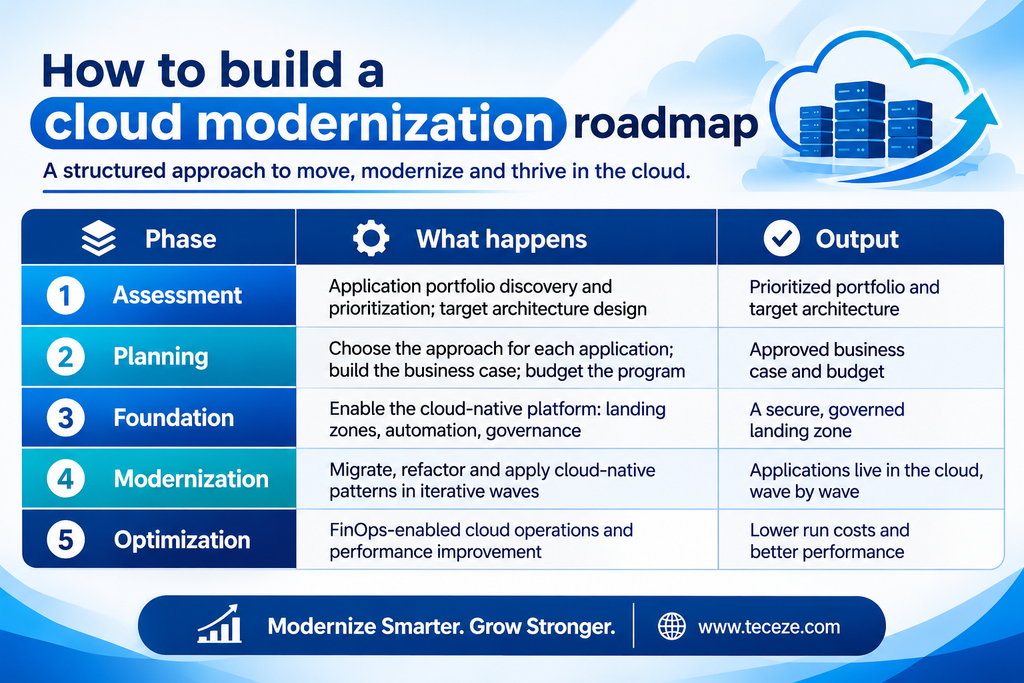
How long does cloud modernization take?
In Teceze’s experience, an enterprise program typically spans 12 to 24 months, with first value within about three months; single applications can move in weeks. To keep a long program on track:
- Set concrete milestones in every phase.
- Define value streams that can be improved within the portfolio.
- Budget cloud costs for each stage.
- Start with a cloud advisory and migration assessment to set the baseline.
Cloud modernization best practices
These practices deliver better results with less risk and expenditure:
- Prioritize business outcomes over technology-specific choices.
- Modernize iteratively to reduce the risk surface.
- Automate everything that can be automated to reduce OPEX.
- Build FinOps and security operations in from the start, through DevSecOps and cloud governance.
- Retire applications when appropriate: the cheapest application to modernize is the one that is turned off.
| Pitfall | Why it happens | How to avoid it |
| Unmapped dependencies | Applications share data and services nobody documented; Flexera 2026 names this the top migration barrier | Map dependencies during the assessment |
| Migrating without modernizing | Teams lift and shift, then stop | Plan modernization waves after the move |
| No cost guardrails | Spend becomes visible only when the bill arrives | Start FinOps in the foundation phase |
| Untested recovery | Disaster recovery is not retested in the new environment | Test failover before go-live with hybrid cloud disaster recovery |
| Lock-in | Proprietary services and data egress fees raise exit costs | Prefer open standards and agree exit terms up front |
| Skills gap | Teams cannot operate the new estate | Budget for change and training |
Cloud modernization in the US and UK
The strategy is the same on both sides of the Atlantic, but the rules around it differ. For UK organisations, cloud modernisation also has to account for UK GDPR and the regulator’s recent cloud findings. Whether you are comparing cloud migration services in the USA or the UK, check these factors:
| Factor | United States | United Kingdom and EU |
| Data protection | Sector rules such as HIPAA, plus state privacy laws such as California’s CCPA | UK GDPR; EU GDPR for EU customers |
| Cloud market rules | No federal cloud-switching law; negotiate exit terms in the contract | UK: the CMA found competition concerns in July 2025 and recommended strategic market status probes into AWS and Microsoft (CMA). EU: no switching charges from 12 January 2027 (Data Act) |
| Legacy pressure | GAO found 7 of the 11 most critical federal legacy systems have known cyber vulnerabilities | The same Microsoft end-of-support dates apply to UK estates |
| Public sector buying | FedRAMP authorization for cloud services sold to federal agencies | G-Cloud framework for UK public-sector cloud buying |
Regulated teams should map each rule to an owner early; governance, risk and compliance support keeps the evidence audit-ready.
Choosing an enterprise cloud modernization partner
Very few companies can run a full enterprise cloud transformation while also sustaining day-to-day operations. Choosing the right partner usually comes down to three things:
- An established set of enterprise cloud modernization playbooks
- Proven cloud transformation expertise
- The operational capability to run cloud-native applications as managed cloud operations
Use this scorecard to compare cloud migration companies and application modernization consulting firms:
| Criterion | Ask the partner | A strong answer looks like |
| Assessment method | How do you choose the right R for each application? | Data-driven portfolio scoring and a costed roadmap |
| Playbooks | Which modernization playbooks will you reuse? | Named, tested playbooks for each pattern |
| Cost model | How do you forecast run costs after migration? | A FinOps model with unit costs, agreed before go-live |
| Security and compliance | How will you meet our regulatory needs? | Controls mapped to SOC 2, ISO 27001, HIPAA or UK GDPR as relevant |
| Operations | Who runs the estate after go-live? | 24/7 managed operations with SLAs (see our SOC vs NOC guide) |
| Exit and portability | How do we avoid lock-in? | Infrastructure as code, open standards and a documented exit plan |
| Local presence | Who supports us in our time zone? | Delivery teams in the US and the UK |
| Proof | Can we see a comparable result? | Case studies with measurable outcomes |
How Teceze helps
Teceze offers cloud modernization services and solutions to enterprises in India, the US, the UK and beyond. That lets us provide end-to-end support for application modernization and continuous 24/7 cloud operations under one roof, so enterprise clients get the most value out of their cloud investments.
Your first 90 days
| Days | What happens | What you get |
| 1–30: Assess | Discovery and application portfolio scoring | A prioritized portfolio and a costed roadmap |
| 31–60: Plan and build the foundation | Business case, landing zone, security and cost guardrails | An approved plan and a governed landing zone |
| 61–90: First wave | Migrate or modernize the first applications; set up FinOps dashboards | First applications live and a cost baseline |
Explore our Cloud & DevOps services, from advisory and migration to FinOps and managed operations.
Book a cloud modernization assessment to get a costed roadmap that your finance and engineering teams can both support.
Frequently asked questions
What is application modernization?
Application modernization updates existing applications so they run better in the cloud. It ranges from replatforming, such as moving to a managed database, to refactoring a monolith into cloud-native services with containers and APIs. The goal is faster releases, easier scaling and lower maintenance cost, without losing business logic that already works.
What is legacy system modernization?
Legacy system modernization updates or replaces aging systems that are costly to maintain, hard to staff or no longer supported. Options range from rehosting and replatforming to refactoring, replacing the system with SaaS, or retiring it. The right choice depends on business value, technical debt, risk and the cost of keeping the system running.
Is lift and shift enough?
Lift and shift (rehosting) is a fast, low-risk way to exit a data center or meet a deadline, but on its own it rarely delivers the agility or savings the cloud promises, and run costs can even rise. Treat it as a first step, then replatform or refactor your high-value applications in later waves.
What is the difference between replatforming and refactoring?
Replatforming makes a few targeted changes so an application runs better in the cloud, such as moving to a managed database, without changing its core architecture. Refactoring re-architects the application as cloud-native, often with containers, microservices and APIs. Replatforming is faster and cheaper; refactoring delivers more agility for high-value applications.
What should a cloud migration checklist include?
A cloud migration checklist should include an application inventory with dependencies; a 7 Rs decision for each application; a target architecture and landing zone; security and compliance controls; data migration and cut-over plans; FinOps budgets and tagging; a tested disaster recovery plan; and training for the teams who will run the new estate.
What is a cloud landing zone?
A cloud landing zone is a pre-configured, secure cloud environment that new workloads move into. It sets up accounts, networking, identity and access, security controls, logging and cost tagging before migration starts, so every application lands in a governed, consistent place. Building it is the foundation phase of the roadmap.