

Data center as a service (DCaaS) lets you rent ready-built data center capacity (space, power, cooling, connectivity and, optionally, hardware and 24/7 operations) instead of building and staffing your own facility. In 2026, companies use it to get AI-ready, power-backed capacity fast, keep control of where sensitive data lives, and avoid large upfront capital costs.
Why are data centers important to business?
Data centers run the systems every business depends on, from ERP and payments to AI models, yet few companies can now build the capacity they need.
The challenge of maintaining a private IT infrastructure has forced companies to consider alternative options to meet their computing needs. Building a private data center involves many costly factors:
- Resource management and finding physical space
- Dedicating experienced IT staff
- Ensuring 24/7 availability
- Racking, cooling, power and bandwidth
Smaller and start-up companies find it difficult to afford the significant cost of building data center infrastructure. Cloud providers offered the public cloud as an answer, and it seemed a good option. But concerns over security, availability and, increasingly, unpredictable cost have led many users to reconsider. There is an alternative: data center as a service (DCaaS).
Despite the move to public cloud, many companies are still wary of giving up the control that comes with running their own private cloud:
- They have critical applications, processes and data they prefer to keep private for security reasons.
- But the servers and resources a private cloud needs are expensive and time-consuming to run.
- DCaaS solves this: it gives you the power and control of an on-premises solution with the flexibility and cost-efficiency of the cloud.
Some organizations use multiple clouds to meet their business requirements. For them, the solution is to incorporate multiple cloud providers into a single network, and DCaaS providers can design these complex networks to make that easy.
In 2026, the pressure is even greater:
- AI is pushing rack power far beyond what most server rooms were designed for.
- Grid power is scarce in major US hubs.
- Skilled data center staff are hard to hire.
Owning a facility used to mean control; today it often means delay. This guide covers:
- What data center as a service is
- Why demand for managed data center services is rising
- How DCaaS compares with colocation and public cloud
- What drives data center cost
- How to select a provider in the United States and worldwide
What is data center as a service (DCaaS)?
Data center as a service (DCaaS) is a hosting service in which a DCaaS provider rents or leases physical data center infrastructure and facilities to a client. Customers remotely access the provider’s storage, servers, networking and computing resources through a wide area network (WAN). DCaaS may also include data management tools for:
- Incident management
- Security
- Server utilization and optimization
In practice, DCaaS is a form of data center outsourcing:
- You pay monthly or by usage.
- You never build or run the facility yourself.
- It becomes one part of a hybrid IT estate, alongside public cloud and any remaining on-premises systems.
A DCaaS contract typically covers:
- Space: cabinets, cages or private suites in a secured facility
- Power and cooling: a committed number of kilowatts (kW) per rack, backed by redundant (N+1 or 2N) systems
- Connectivity: carrier-neutral internet, cross-connects and private on-ramps to public clouds such as AWS, Microsoft Azure and Google Cloud
- Hardware (optional): leased servers, storage and network gear, including GPU systems
- Operations (optional): 24/7 NOC monitoring, remote hands and on-site smart hands, patching, backup and disaster recovery
- Security and compliance: physical access control, surveillance, and third-party audit reports
In the colocation vs. cloud debate, DCaaS sits in the middle:
- Data center colocation: you rent space and power and do everything else.
- Public cloud: you rent virtual resources, and the provider owns everything.
- DCaaS: you get colocation plus optional hardware and managed operations under one contract.
The comparison table further down shows where each model fits.
Why do we need a data center as a service (DCaaS)?
Because the infrastructure modern workloads need (high-density, power-backed, well-connected and professionally run) is now slower, costlier and riskier to build in-house than to rent.
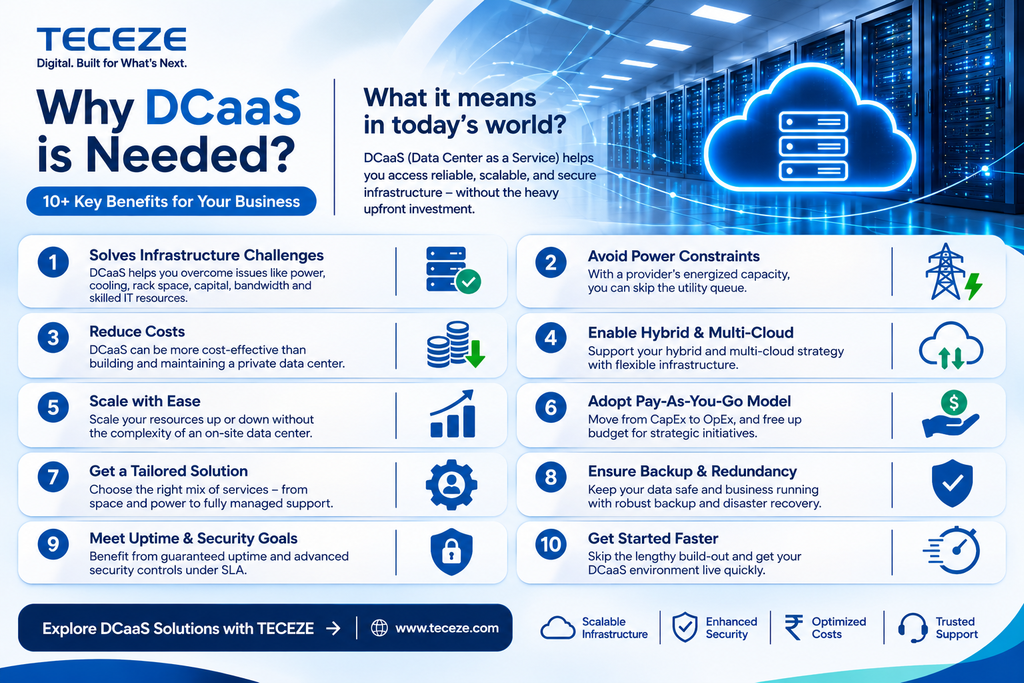
Cyberattacks are increasing, workloads keep growing, and the pace of competition never slows. The pressure is to innovate and digitally transform your business. So what do you do when your data center can’t keep up? Here are 11 reasons DCaaS is needed, with what each one means in 2026:
Six forces making DCaaS more urgent in 2026
Six market forces have made these reasons more pressing than ever.
1. AI is outgrowing the server room
- Gartner forecasts worldwide spending on data center systems will reach $822 billion in 2026, up 62.5% in one year, making it the fastest-growing IT segment (Gartner).
- Data center power density is climbing with AI infrastructure. Uptime Institute’s 2026 survey of more than 800 operators found a growing number now run peak rack densities of 30 kW or more (Uptime Institute).
- At that level, many operators add liquid cooling.
2. Power is the new bottleneck
- The International Energy Agency (IEA) estimates data centers used about 415 TWh of electricity in 2024, around 1.5% of global consumption, and projects roughly 945 TWh by 2030 (IEA).
- The US accounted for 45% of the 2024 total.
- US data centers used 4.4% of national electricity in 2023 and could use 6.7%–12% by 2028, according to Lawrence Berkeley National Laboratory’s report for the Department of Energy (DOE).
- The IEA warns that around 20% of planned data center projects could be delayed by grid constraints.
- A provider with energized capacity lets you skip that queue.
3. Capacity is scarce, so speed matters
- Vacancy in North America’s primary data center markets fell to a record-low 1.4% in the first half of 2026 (CBRE).
- 80.4% of capacity under construction was already pre-leased.
- Less than 1,500 MW of future capacity remained, about six months of demand.
- In Northern Virginia, North America’s largest market, vacancy was just 0.2%.
4. Hybrid is the norm, and cloud waste is real
- 73% of organizations run hybrid cloud, according to Flexera’s 2026 State of the Cloud Report (Flexera).
- Wasted cloud spend rose to 29%, the first increase in five years, as AI workloads surged.
- Some teams call the response cloud repatriation; most simply move steady, predictable workloads onto dedicated hybrid cloud infrastructure and keep bursty ones in public cloud.
- DCaaS gives those steady workloads a cost-stable home, and FinOps practices keep both sides of a managed hybrid cloud infrastructure in check.
5. Skilled staff are hard to find
- More than half of operators in Uptime Institute’s 2026 survey report difficulty hiring qualified candidates.
- Data center managed services shift facilities engineering, 24/7 monitoring and on-site support to a provider staffed for it.
6. Data sovereignty rules are tightening
- The EU Data Act has applied since 12 September 2025 (European Commission).
- From 12 January 2027, providers of data-processing services may no longer charge customers for switching (Data Act, Article 29).
- DCaaS lets you choose the country, and often the building, where data lives (data residency).
- That control over data sovereignty helps with GDPR in Europe (see our GDPR compliance checklist) and with sector rules such as HIPAA and PCI DSS in the US.
What does data center as a service offer?
Data center as a service (DCaaS) offers eight core benefits. Use the right-hand column to check that a provider can actually deliver each one.
| # | What DCaaS offers | How to check it in 2026 |
| 1 | Agility, robustness and scalable capacity | Ask how much capacity is energized today and get expansion rights in writing. |
| 2 | Low operational IT cost and a flexible payment model based on usage | Get itemized pricing for power, cross-connects, remote hands and escalators. |
| 3 | Support and services from certified and experienced experts | Confirm 24/7 on-site staffing and remote-hands response times. |
| 4 | Improved SLAs through standardized IT infrastructure architecture | Look for Uptime Institute Tier certification of the specific site. |
| 5 | Assured safety and security compliance at appropriate locations and jurisdictions | Confirm data residency and current audit reports for that facility. |
| 6 | Efficient power and heat cooling with low environmental impact | Request measured PUE, WUE and renewable share, plus liquid cooling for AI racks. |
| 7 | Monitoring and visualization of the data center across all systems | Ask for a customer portal and 24/7 NOC monitoring. |
| 8 | Disaster recovery and backup plans, procedures and processes in case of data center failover | Test failover before go-live and on a regular schedule. |
DCaaS vs. colocation vs. public cloud vs. on-premises
| Model | What you get | What you still manage | How you pay | Best for | Main trade-off |
| On-premises | Your own building, power and staff | Everything | Large upfront capital plus running costs | Strict control; existing, paid-off facilities | Slow to expand; hard to retrofit for AI density |
| Colocation | Space, power, cooling, physical security | Hardware, network and operations | Monthly, per kW or per rack, plus cross-connects | Teams with strong in-house operations | You still buy hardware and staff operations |
| DCaaS | Colocation plus optional hardware and managed operations under one SLA | Applications and data (scope varies by contract) | Monthly subscription or usage-based; little or no capital outlay | Predictable, regulated or AI workloads needing dedicated infrastructure | Contract minimums; less elastic than public cloud |
| Public cloud (IaaS) | Virtual compute, storage and services on demand | Configuration, applications, data and cost control | Pay per use, plus data egress fees | Spiky or experimental workloads; fast global reach | Costs hard to forecast; less control over location and hardware |
Rule of thumb for the on-premises vs. cloud decision:
- Run predictable, data-heavy or regulated workloads on DCaaS or colocation.
- Keep elastic and experimental workloads on infrastructure as a service.
- Connect the two with private links.
- Unsure where a workload belongs? Start with a cloud advisory and migration assessment.
Who manages what: responsibilities by model
The biggest difference between the four models is who does the work, and how much of it you buy back as managed data center services. Use this matrix to check what you would hand over, and what stays with your team.
| Layer | On-premises | Colocation | DCaaS | Public cloud (IaaS) |
| Building, power and cooling | You | Provider | Provider | Provider |
| Physical security | You | Provider | Provider | Provider |
| Network carriers and cross-connects | You | Shared | Provider or shared | Provider |
| Servers, storage and GPUs | You | You | Provider if leased, else you | Provider |
| Hardware maintenance and refresh | You | You | Provider if leased | Provider |
| 24/7 monitoring and remote hands | You | You (remote hands extra) | Provider | Provider (infrastructure only) |
| Operating systems and patching | You | You | Shared, by contract | You |
| Applications and data | You | You | You | You |
| Identity, access and data security | You | You | You | You |
- DCaaS scope varies by provider, so get it in writing as a RACI (responsible, accountable, consulted, informed) chart before you sign.
- The monitoring and remote-hands rows are where contracts differ most; see how field IT services reduce downtime.
Which workloads belong on DCaaS?
Most organizations end up with a mix. Match each workload to the model that fits its usage pattern, risk and performance needs.
| Workload | Best fit | Why |
| Core ERP and databases with steady load | DCaaS or colocation | Predictable usage; a flat monthly cost beats per-hour billing |
| AI model training | AI-ready DCaaS or GPU cloud | Needs high-density racks and liquid cooling; long jobs favour dedicated hardware |
| AI inference in production | DCaaS near users, or public cloud | Steady demand suits dedicated GPUs; spiky demand suits cloud |
| Regulated data (patient, payment, financial) | DCaaS | Known location, audited facility, dedicated hardware |
| Backup and disaster recovery | DCaaS in a second region | Geographic separation and testable failover |
| Customer-facing apps with traffic spikes | Public cloud, with DCaaS back end | Auto-scaling and global reach |
| Dev, test and short projects | Public cloud | Pay per use; create and delete in minutes |
| Latency-sensitive factory or IoT systems | Edge colocation or on-premises | Must sit close to the devices they control |
Can DCaaS support AI and GPU workloads?
Yes, if the facility is built for high density.
- AI training and large-scale inference pack GPU servers into racks that can draw 30 kW or more.
- That calls for a liquid cooling data center design, heavy power distribution and fast networking.
- Many enterprise server rooms and older colocation halls cannot deliver this.
- AI-ready DCaaS, high-density colocation or GPU as a service on dedicated hardware is often the quickest path to production AI infrastructure.
- DCaaS also gives generative AI projects a private hosting option when data cannot leave your control.
Ask every provider:
- What is the maximum kW per rack today, and how much high-density capacity is available now versus planned?
- Which liquid cooling options do you support: direct-to-chip, rear-door heat exchangers or immersion?
- Can I bring my own GPU servers, or do you offer GPU-as-a-service on dedicated hardware?
- What network fabric and latency do you offer between GPU clusters, storage and public cloud regions?
- How is power redundancy designed for high-density rows (N+1 or 2N)?
Cooling options for AI racks compared
| Cooling method | How it works | Rack density it suits | Retrofit effort | Best for |
| Air cooling with aisle containment | Fans push chilled air through racks; hot and cold aisles are separated | Low to moderate | Low | General enterprise servers and storage |
| Rear-door heat exchanger | A water-cooled coil on the rack door removes heat as air leaves | Moderate to high | Moderate | Upgrading existing halls for denser racks |
| Direct-to-chip liquid cooling | Coolant flows through cold plates on CPUs and GPUs | High | High: needs coolant distribution units and piping | GPU clusters for AI training and inference |
| Immersion cooling | Servers sit in tanks of non-conductive fluid | Very high | High: special tanks and hardware support | Specialised, very dense deployments |
Ask whether liquid cooling is live today in the hall you would use, or only planned.
How much does DCaaS cost?
There is no single price list. Like colocation pricing, DCaaS is usually billed monthly:
- Mainly by committed power (kW)
- Then by space, connectivity and the managed services you add
Data center cost is rising where capacity is tight. In North America’s primary markets, asking rents rose 4.3% to 8.3%, depending on deployment size, in the first half of 2026 (CBRE).
What you pay for, and what to check:
| Cost item | Typically billed as | What to check |
| Committed power | Per kW per month (usually the largest line) | Committed vs. metered billing and overage rates |
| Space | Per cabinet, cage or suite, often bundled with power | Room to grow next to your footprint |
| Energy pass-through | Metered kWh, sometimes multiplied by the site’s PUE | How utility price rises are passed on |
| Location premium | Built into rates | Constrained hubs cost more than secondary markets |
| Resilience level | Built into rates | Tier design, N+1 or 2N, and SLA percentage |
| Cross-connects | Monthly fee per connection | Number needed for carriers, cloud on-ramps and partners |
| Bandwidth | Committed Mbps or 95th-percentile billing | Burst pricing and carrier choice |
| Remote hands | Per hour or prepaid block | Response times and after-hours rates |
| Managed services | Monthly, per device or per service | Exact scope (monitoring, patching, backup) in a RACI |
| Leased hardware and GPUs | Monthly over a fixed term | Refresh cycle and buyout options |
| Installation | One-time setup fee | Whether it is waived on longer terms |
| Price escalator | Annual percentage increase | A cap on the escalator in the contract |
| Exit | Migration support and early-termination terms | Data portability; EU Data Act switching rules |
Longer terms usually lower the monthly rate, but lock in today’s design. Match term length to how long the workload will stay.
Compare options on a five-year total cost of ownership (TCO), not just the monthly fee. Include:
- Staff
- Power
- Hardware refresh
- Downtime risk
- Migration
Then build the result into your IT budget for 2026 and beyond.
Is DCaaS secure and compliant?
It can be, but security is shared:
- The provider secures the building, power, cooling and physical access, and supplies audit evidence.
- You remain responsible for your data, identities, applications and configurations.
- Ask for current third-party reports, not marketing claims.
- Regulated sectors such as healthcare and financial services should map every framework below to a named owner, or use managed compliance and infrastructure security to cover the layers that stay with you.
Frameworks to ask about, and the evidence to request:
| Framework | Region | Applies to | Ask the DCaaS provider for |
| ISO/IEC 27001 | Global | Any organization managing information security | Current certificate whose scope covers the facility |
| SOC 2 Type II | Global (US-led) | Service providers handling customer data | Latest report plus a bridge letter |
| Uptime Institute Tier certification | Global | Facility design and construction | Tier certificate for the specific site |
| PCI DSS | Global (card industry) | Anyone storing, processing or transmitting card data | Attestation of Compliance covering physical controls |
| GDPR / UK GDPR | EU / UK | Anyone processing personal data of people in the EU or UK | Data processing agreement, data location, transfer safeguards |
| EU Data Act | EU | Providers and customers of data-processing services | Switching and exit terms; no switching charges from 12 January 2027 |
| NIS2 | EU | Essential and important entities, including data center service providers | Security measures and incident-reporting process |
| DORA | EU | Financial entities and their ICT third-party providers | Contract clauses on ICT risk, testing and exit |
| Energy Efficiency Directive | EU | Data centers with at least 500 kW of installed IT power | Published annual energy data (required since 15 May 2024) |
| HIPAA | US | Healthcare providers, health plans and their business associates | Business associate agreement where required |
| FedRAMP | US | Cloud services sold to federal agencies | Authorization status, if you serve government |
| CMMC | US | Defense contractors handling controlled unclassified information | Evidence for physical protection controls |
| State privacy laws (e.g., California CCPA) | US | Businesses meeting each state’s thresholds | Data location and processor terms |
DCaaS considerations by region
The same DCaaS contract carries different risks in different markets. These are the differences that most change a buying decision.
What uptime SLAs really mean
A small change in a data center SLA percentage is a large change in allowed downtime. Figures below are calculated for a 365-day year and a 30-day month.
| SLA availability | Maximum downtime per year | Maximum downtime per month |
| 99.9% | 8.76 hours | 43.2 minutes |
| 99.95% | 4.38 hours | 21.6 minutes |
| 99.99% | 52.6 minutes | 4.3 minutes |
| 99.999% | 5.3 minutes | 26 seconds |
Before you sign, ask:
- How is availability measured: per circuit, per rack or per site?
- What counts as downtime, and how is planned maintenance treated?
- What service credits do you receive if the SLA is missed?
The promise should match the building. Data center tiers (Tier I to Tier IV) describe how much redundancy stands behind data center uptime. Pair any SLA with tested backup and disaster recovery so a site outage never becomes a business outage.
How to select a DCaaS provider
The DCaaS process includes analyzing your existing infrastructure to ensure maximum reliability and availability in case of any failure or downtime.
- Digitalization is everywhere, leading to high-density, consolidated or virtualized data centers in complex environments.
- Every decision in a data center is crucial; even a small mistake can cost you dearly.
10-point DCaaS provider scorecard
Use this scorecard to compare data center as a service providers side by side:
- Score each provider from 1 to 5 on every row.
- Multiply each score by the weight (High = 3, Medium = 2).
- Add up the totals and compare.
For the monitoring side of the contract, see the questions to ask before signing up for NOC services.
| # | Criterion | Ask the provider | A strong answer looks like | Weight |
| 1 | Power now and later | How much capacity is energized today, and when can I expand? | Capacity available now, with expansion rights in writing | High |
| 2 | Density and cooling | What is the maximum kW per rack, and is liquid cooling live? | Liquid cooling running today in the hall you would use | High |
| 3 | Resilience | Which Tier certification and SLA apply to my space? | Certified design; SLA in writing with service credits | High |
| 4 | Location and sovereignty | Which country and building will hold my data? | A named site; data stays in-region by contract | High |
| 5 | Security evidence | Can I see current SOC 2 Type II and ISO 27001 reports? | Recent reports that cover this facility | High |
| 6 | Connectivity | Which carriers and cloud on-ramps are on site? | Carrier-neutral, several carriers, private cloud links | Medium |
| 7 | Operations | Who monitors 24/7, and how fast do remote hands respond? | On-site staff around the clock; response times in the SLA | Medium |
| 8 | Sustainability | What are this site’s PUE, WUE and renewable share? | Measured, published figures, not targets | Medium |
| 9 | Commercials | How are power, overages and annual escalators priced? | Itemized pricing and a capped escalator | Medium |
| 10 | Exit terms | How do I get my data and hardware out? | A documented exit plan; no or capped switching fees | Medium |
When is DCaaS the wrong choice?
DCaaS is not always the answer. Consider alternatives when:
- Workloads are small or highly variable and suit pay-per-use infrastructure as a service.
- The project is shorter than typical contract minimums.
- You already run a modern, under-used facility with an experienced team.
- Applications need ultra-low latency at many local sites, where an edge data center or edge colocation fits better.
How to get started: a five-step roadmap
Treat these five steps as a high-level data center migration checklist; the FAQ below lists what each migration wave needs.
- Assess: inventory workloads and rate each on latency, compliance, power density and growth.
- Model: build a five-year TCO comparing on-premises, colocation, DCaaS and public cloud, and flag data center consolidation opportunities where several server rooms can merge into one DCaaS footprint.
- Shortlist and reserve: use the scorecard above, then secure capacity early; in tight markets, power is pre-leased months ahead.
- Migrate: plan the data center migration in waves (connectivity, data transfer, cut-over windows) with a cloud advisory and migration partner, and test hybrid cloud disaster recovery before go-live.
- Operate and optimize: review SLA reports quarterly and apply FinOps discipline across DCaaS and cloud.
How Teceze helps
We at Teceze assess and provide consultancy services that help organizations overcome the complexity of maintaining critical IT facility infrastructure whenever software or hardware changes are added to the data center.
Teceze can help you centrally manage your IT infrastructure and make optimized use of existing IT resources. The value shows up as lower total cost of ownership, asset flexibility and these infrastructure improvements:
- Self-service capabilities
- Capacity planning
- Service-level management
- Proactive systems monitoring
Teceze can help you get data center as a service through our partnerships with different data center providers, for organizations in the US and worldwide:
- Data center managed services cover servers, storage, virtualization and facility coordination.
- Global SOC and NOC monitoring watches them around the clock.
- Smart hands engineers handle on-site work.
These comprehensive solutions help reduce your expenses so your business can focus on growth and expansion. Comparing operating models? Read SOC vs NOC: a CIO’s guide or our enterprise guide to cloud modernization.
Proof point: in an enterprise infrastructure support program delivered with Infosys for AGCO across 95 sites in 25 countries, resolution SLA rose from 93% to 99% within six months.
The only way to protect what you’ve worked hard to build is to be vigilant when it comes to cybersecurity and infrastructure resilience. If you’d like to know more about how your business can benefit from DCaaS and managed services, just give us a call and schedule a consultation.
Frequently asked questions about DCaaS
1. What is the difference between DCaaS and colocation?
Colocation rents you space, power and cooling; you supply and manage your own hardware and operations. DCaaS starts with the same facility but can bundle leased hardware, monitoring, remote hands, backup and disaster recovery under one contract and SLA. Choose colocation if you have strong in-house operations, DCaaS if you want them managed.
2. DCaaS vs. IaaS: is DCaaS the same as public cloud?
No. Infrastructure as a service (IaaS) rents virtual machines and storage on shared cloud platforms, billed per use. DCaaS gives you dedicated physical infrastructure in a known facility, usually on monthly terms. Many organizations combine both: DCaaS for steady, regulated or GPU-heavy workloads and IaaS for elastic ones, linked by private connections.
3. Is DCaaS cheaper than building your own data center?
For most organizations, yes. DCaaS avoids the capital cost and long lead times of building a facility and securing utility power, and spreads engineering and staffing costs across customers. It can cost more than a fully depreciated facility you already own, so compare five-year total cost of ownership, including staff, power, refresh and downtime risk.
4. Can DCaaS run AI and GPU workloads that need liquid cooling?
Yes, when the facility supports high-density racks. Uptime Institute’s 2026 survey found a growing number of operators running peak densities of 30 kW or more per rack. Before signing, confirm the provider’s maximum kW per rack, liquid cooling options, high-density capacity available now, and the network fabric between GPU clusters and storage.
5. Is DCaaS compliant with GDPR, HIPAA and PCI DSS?
DCaaS can support compliance but does not make you compliant on its own. The provider secures and audits the physical environment; you secure data, access and applications. Request SOC 2 Type II and ISO 27001 reports, confirm where data is stored, and sign a HIPAA business associate agreement when the provider can access systems holding patient data.
6. How long does a data center migration to DCaaS take?
It depends on scope. Moving a few racks into available space can take weeks; migrating a full estate or deploying high-density AI clusters takes months. In capacity-constrained US markets, power availability is often the gating factor, so reserve capacity early and plan the migration in parallel.
7. Does the EU Data Act make it easier to switch DCaaS providers?
Yes, for services that count as data-processing services. The Data Act has applied since 12 September 2025 and sets rules for switching providers and moving data. From 12 January 2027, providers may no longer charge switching fees. Check how your contract is classified and what exit support it includes.
8. What is managed colocation?
Managed colocation is standard colocation (space, power and cooling) plus provider-run services such as 24/7 monitoring, remote hands, patching and backup. It sits very close to DCaaS. The main difference is that DCaaS can also bundle leased servers, storage or GPUs, so one provider delivers the whole infrastructure stack under one contract and SLA.
9. What is hybrid IT?
Hybrid IT is an operating model that combines on-premises systems, colocation or DCaaS, and one or more public clouds, managed as a single estate. Each workload runs where it fits best on cost, performance and compliance. DCaaS usually hosts the steady, regulated or GPU-heavy part of a hybrid IT estate, linked to cloud by private connections.
10. What is a Tier 3 data center?
Under Uptime Institute’s Tier Standard, a Tier III data center is concurrently maintainable: redundant components and distribution paths let any part be shut down for maintenance without affecting IT operations. Tier IV adds fault tolerance, so an equipment failure does not interrupt IT. Ask DCaaS providers for Tier certification of the specific site, not the company.
11. What does 99.99% uptime mean?
A 99.99% uptime SLA allows about 52.6 minutes of downtime per year, or roughly 4.3 minutes in a 30-day month. By comparison, 99.9% allows about 8.8 hours a year. Check how the provider measures availability, whether planned maintenance counts as downtime, and what service credits apply when the SLA is missed.
12. What should a data center migration checklist include?
A data center migration checklist should cover a full inventory of applications and dependencies; target capacity, power and cooling; network and cloud connectivity; the data transfer method; a cut-over and rollback plan for each wave; a disaster recovery test before go-live; compliance sign-off; and secure decommissioning of old hardware.